How it works
From one invitation to a full headcount.
What each guest receives, what happens after every kind of answer, and what you see in your guest list. Guests answer in the WhatsApp chat, with no form to open.
Not a mockup
This is Avently, running.
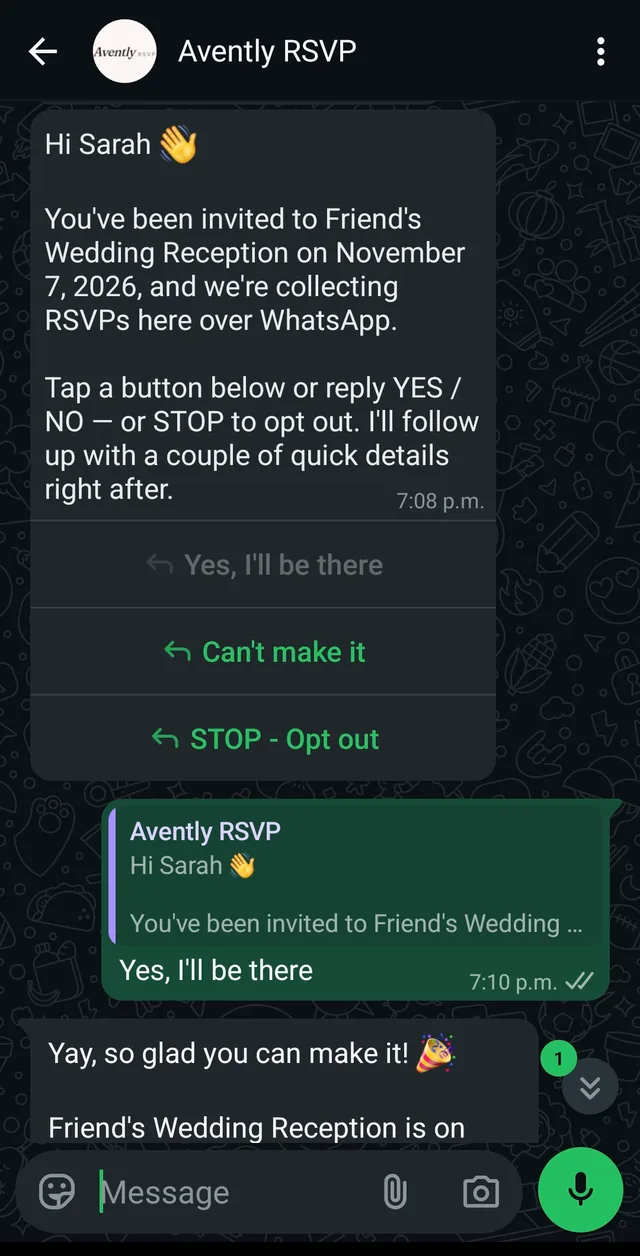
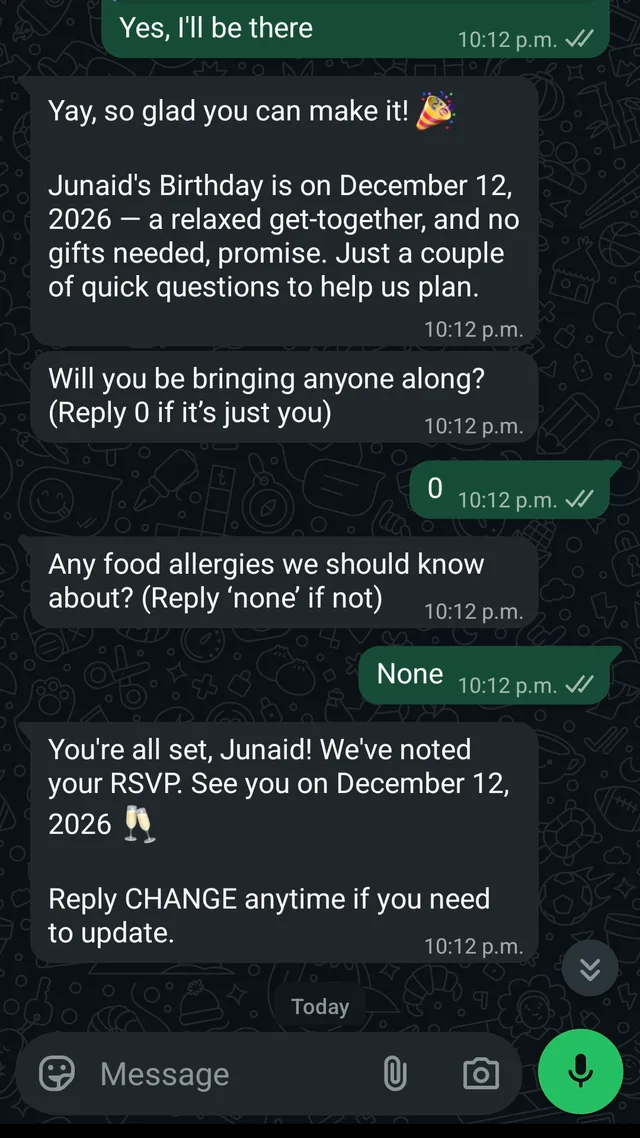
Two conversations from our own events, screenshotted off a phone. Nothing here is drawn, staged or sped up.
Avently sends from its own WhatsApp Business number, never from yours.
What lands on their phone
An invitation, not a notification.
- Your cover image
- The invitation arrives as a card with your artwork on top, not a wall of text.
- Name and date
- Set once when you build the event, filled in per guest.
- Three buttons
- Yes, can’t make it, and a way to opt out. No typing required.
- After a yes, the event page
- Venue, map, dress code and calendar buttons.

Benefit dinner

Milestone birthday

Corporate offsite

Product launch
How WhatsApp invitations work — including which part Meta fixes and which part you write.
Every answer has a path
Including the ones you’d rather not get.
- Yes
- Your questions go out, their answers come back, and they keep a link to the event page.
- Can’t make it
- Marked No in the same row. No follow-up questions, no reminders, no chasing.
- No reply
- Up to two nudges, a week apart, sent when you choose.
- Opt out
- One tap and Avently stops messaging that number — this event and every future one.
Meanwhile, in your sheet
Avently writes it.
Your own Google Sheet, written as the answers arrive — names, party size, dietary notes, the lot. Nothing to export, nothing to reconcile.
| № | Guest | Party | Reply |
|---|---|---|---|
| 01 | Amara Osei | +1 | Yes · 2 |
| 02 | Daniel Reyes | — | Yes · 1 |
| 03 | The Okonkwo family | +3 | Yes · 4 |
| 04 | Priya Raman | +1 | No |
| 05 | Marcus Lindqvist | — | Yes · 1 |
| 06 | Sofia Marchetti | +1 | Yes · 2 |
| 07 | Hana Kobayashi | — | Yes · 1 |
| 08 | Tomás Ferreira | +1 | No |
| + 66 more replies | |||
| Seats confirmed | 97 | ||
Questions
About the details.
Is this only for parties?
No. It works for anything with a guest list and a headcount: weddings, benefit dinners, milestone birthdays, corporate offsites, member events, product launches.
What if a guest doesn’t have WhatsApp?
You’ll see the failure in your dashboard and can follow up another way. WhatsApp is the most-installed messaging app in most countries, but it isn’t everywhere.
Is there an API?
Not yet. An API is in development for businesses that want to connect Avently to their own systems. Email info@avently.studio to hear when it opens.
Do guests type their answers or tap buttons?
They tap. The invitation arrives with Yes and No buttons, plus a way to opt out. Follow-up questions with up to three options show as buttons, and four to ten options open as a list menu. A guest who types instead is understood too.
Can I make my event invite-only?
It already is. Only the people on your guest list get an invitation, and each answer is recorded against that guest’s phone number. The event page shows the date, venue and details but has no sign-up form, so there is nothing for an uninvited person to fill in.
Can each guest choose their own meal?
Yes. Add a follow-up question such as “Chicken, fish or vegetarian?” and every guest who says yes answers it in the chat, from up to ten options shown as buttons or a list menu. Their choice is written into your guest sheet next to their name.
Do you handle seating charts and check-in?
Not yet. Avently records who said yes, how many seats each guest needs and their answers in your Google Sheet, where you can add a table column, sort it, and print it as a door list.
Does each event get its own page?
Yes. Every event gets a short link, such as avently.studio/e/xy79z, with the cover image, date and time, venue with a one-tap maps link, dress code, and add-to-calendar buttons. Shared on WhatsApp it previews as a card.
Can guests add the event to their calendar?
Yes. The event page has Google Calendar, Apple Calendar, and .ics buttons, so the date goes into their calendar with the venue attached.
Can I send to guests in other countries?
Yes. Canada, the Caribbean nations that share +1, and anywhere else WhatsApp reaches, as long as each number is in E.164 format with its country code. The United States is the one exception for invitations.