They tap.You’re done.
Get your replies in minutes. Your guests answer in WhatsApp; your sheet keeps the count.

Hi Amara 👋 You’ve been invited by Sarah to Riverside Benefit Dinner on 7 November. Can you make it? Tap a button below to RSVP.
Yes, I’ll be there
Can’t make it
STOP - Opt out
No card. Your guests already have WhatsApp.
97seats confirmed at 11:04.
You were in a meeting.
How it works
Three steps. Nothing for your guests to install.
- Step 01
Connect your guest list
Point Avently at a Google Sheet with names, phone numbers, and seats.
- Step 02
Write the invitation
The event details go into the invitation. Guests who accept get your follow-up questions.
- Step 03
Send, and watch replies land
Every guest gets a personally addressed message. Their answers write back to your sheet.
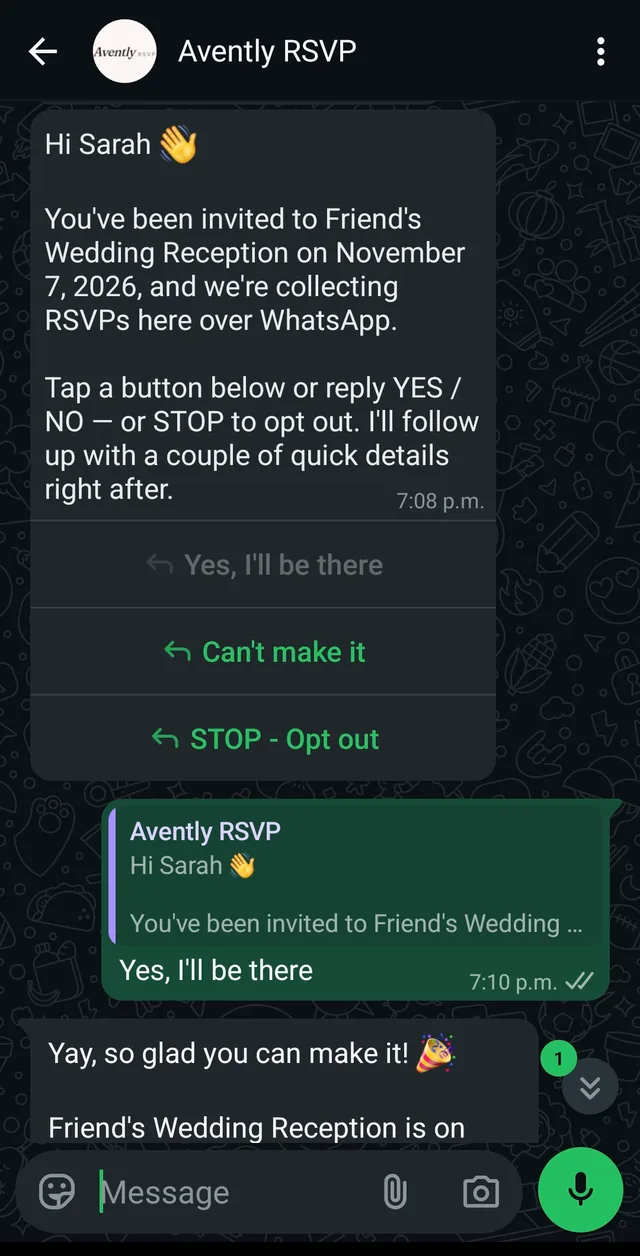
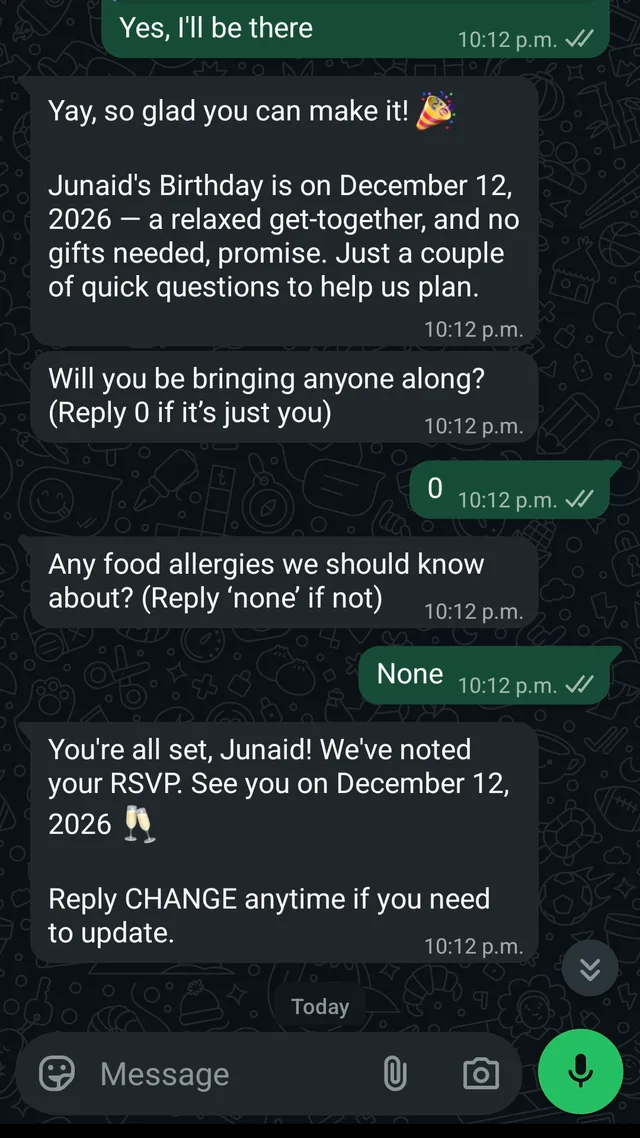
Not a mockup
This is Avently, running.
Two conversations from our own events, screenshotted off a phone. Nothing here is drawn, staged or sped up.
Try it — no account
See your invitation before you send it.
Type your event name, pick a cover, and see the WhatsApp card.
Cover

Hi Amara 👋 You’ve been invited by Sarah to Riverside Benefit Dinner on 7 November. Can you make it? Tap a button below to RSVP.
Yes, I’ll be there
Can’t make it
STOP - Opt out
What lands on their phone
An invitation, not a notification.
- Your cover image
- The invitation arrives as a card with your artwork on top, not a wall of text.
- Name, date and time
- Set once when you build the event, filled in per guest.
- Venue and a map pin
- One tap opens directions on their phone.
- Dress code
- If you set one. Skipped if you don’t.
- Three buttons
- Yes, can’t make it, and a way to opt out. No typing required.
- A confirmation they can keep
- The event page link, with add-to-calendar and directions.
Benefit dinner

Milestone birthday

Corporate offsite

Product launch
How WhatsApp invitations work — including which part Meta fixes and which part you write.
Every answer has a path
Including the ones you’d rather not get.
- Yes
- Your questions go out, their answers come back, and they keep a link to the event page.
- Can’t make it
- Marked No in the same row. No follow-up questions, no reminders, no chasing.
- No reply
- One nudge a week on the same three buttons. It stops the moment they answer.
- Opt out
- One tap and Avently stops messaging that number — this event and every future one.
Meanwhile, in your sheet
Avently writes it.
Your own Google Sheet, written as the answers arrive — names, party size, dietary notes, the lot. Nothing to export, nothing to reconcile.
| № | Guest | Party | Reply |
|---|---|---|---|
| 01 | Amara Osei | +1 | Yes · 2 |
| 02 | Daniel Reyes | — | Yes · 1 |
| 03 | The Okonkwo family | +3 | Yes · 4 |
| 04 | Priya Raman | +1 | No |
| 05 | Marcus Lindqvist | — | Yes · 1 |
| 06 | Sofia Marchetti | +1 | Yes · 2 |
| 07 | Hana Kobayashi | — | Yes · 1 |
| 08 | Tomás Ferreira | +1 | No |
| + 66 more replies | |||
| Seats confirmed | 97 | ||
For associations
Running a members’ association?
Avently also checks join requests against your member list, coordinates volunteer outreach and confirms panel speakers.
See how it works for associationsPricing
Pay by the invitation.
Free
$0CAD
your first 25 invitations every month
renews on the 1st
Single event
$30CAD
up to 50 invitations
60¢ each · for that event, paid when you send
Single event
$49CAD
up to 100 invitations
49¢ each · for that event, paid when you send
Single event
$99CAD
up to 250 invitations
40¢ each · for that event, paid when you send
Unlimited
From $79 CAD a month
unlimited invitations every month, up to 250 per event
member verification and team outreach · nothing per event
- WhatsApp delivery to your whole guest list
- Follow-up questions with every invitation
- Live response dashboard
- Google Sheets sync
- Two reminder nudges per guest
We count invitations sent, not guests who attend. A no costs the same as a yes, and replies never change your bill. You never have to pick a plan, and there is no threshold to fall off — every invitation is priced on its own, and you see the total before you send.
Get started
Your next headcount, without the chasing.
25 free invitations every month, no card.
Still deciding? Read the questionsQuestions
Common questions.
How do I collect RSVPs over WhatsApp?
+
Connect a Google Sheet with names and phone numbers, write your invitation, and Avently sends each guest a personally addressed WhatsApp message. Their replies are written back into the sheet as they arrive.
Read the guideWill my guests know it’s automated?
+
Messages arrive addressed to one person by name, one guest at a time, and everything after their first reply is in the wording you wrote. The first message goes out on a template Meta approved in advance, so its wording and its button labels are the same for every event; from their reply onwards the conversation is yours. Most guests answer as though you had texted them yourself.
Read the guideIs this only for parties?
+
No. It works for anything with a guest list and a headcount: benefit dinners, milestone birthdays, corporate offsites, member events, product launches.
What if a guest doesn’t have WhatsApp?
+
You’ll see the failure in your dashboard and can follow up another way. WhatsApp is the most-installed messaging app in most countries, but it isn’t everywhere.
Do I need a WhatsApp Business account?
+
No. Avently runs the WhatsApp side. You write the invitation and connect your guest sheet.
Do guests type their answers or tap buttons?
+
They tap. The invitation arrives with Yes and No buttons, plus a way to opt out. Follow-up questions with up to three options show as buttons, and four to ten options open as a list menu. A guest who types instead is understood too.
Read the guideDoes each event get its own page?
+
Yes. Every event gets a short link, such as avently.studio/e/xy79z, with the cover image, date and time, venue with a one-tap maps link, dress code, and add-to-calendar buttons. Shared on WhatsApp it previews as a card, and a guest who RSVPs on the page lands in the same sheet as one who taps in the chat.
Can guests add the event to their calendar?
+
Yes. The event page has Google Calendar, Apple Calendar, and .ics buttons, so the date goes into their calendar with the venue attached.
Can I invite guests in the United States?
+
Not with invitations. WhatsApp does not deliver event invitations to US phone numbers, so Avently skips every US number on your sheet and shows you which ones it skipped before you pay. US territories — Puerto Rico, the US Virgin Islands, Guam — are treated the same way. Member verification, team outreach and panel confirmations do reach US numbers. The invitation limit is a WhatsApp restriction, not a choice we made, and we will say so here the moment it lifts.
Can I send to guests in other countries?
+
Yes. Canada, the Caribbean nations that share +1, and anywhere else WhatsApp reaches, as long as each number is in E.164 format with its country code. The United States is the one exception for invitations.
How much does Avently cost?
+
Price is set by how many invitations you send, not by how many guests attend. The first 25 invitations each month are free. There is no subscription unless you choose the monthly Unlimited plan.
Is my guest list private?
+
Yes. Avently uses your guest list only to send the invitations you approve and record the replies, and never sells it. To deliver the messages, guest names, phone numbers and replies pass through the services named in our Privacy Policy, such as Twilio and WhatsApp, which store and process it in the United States and possibly other countries.